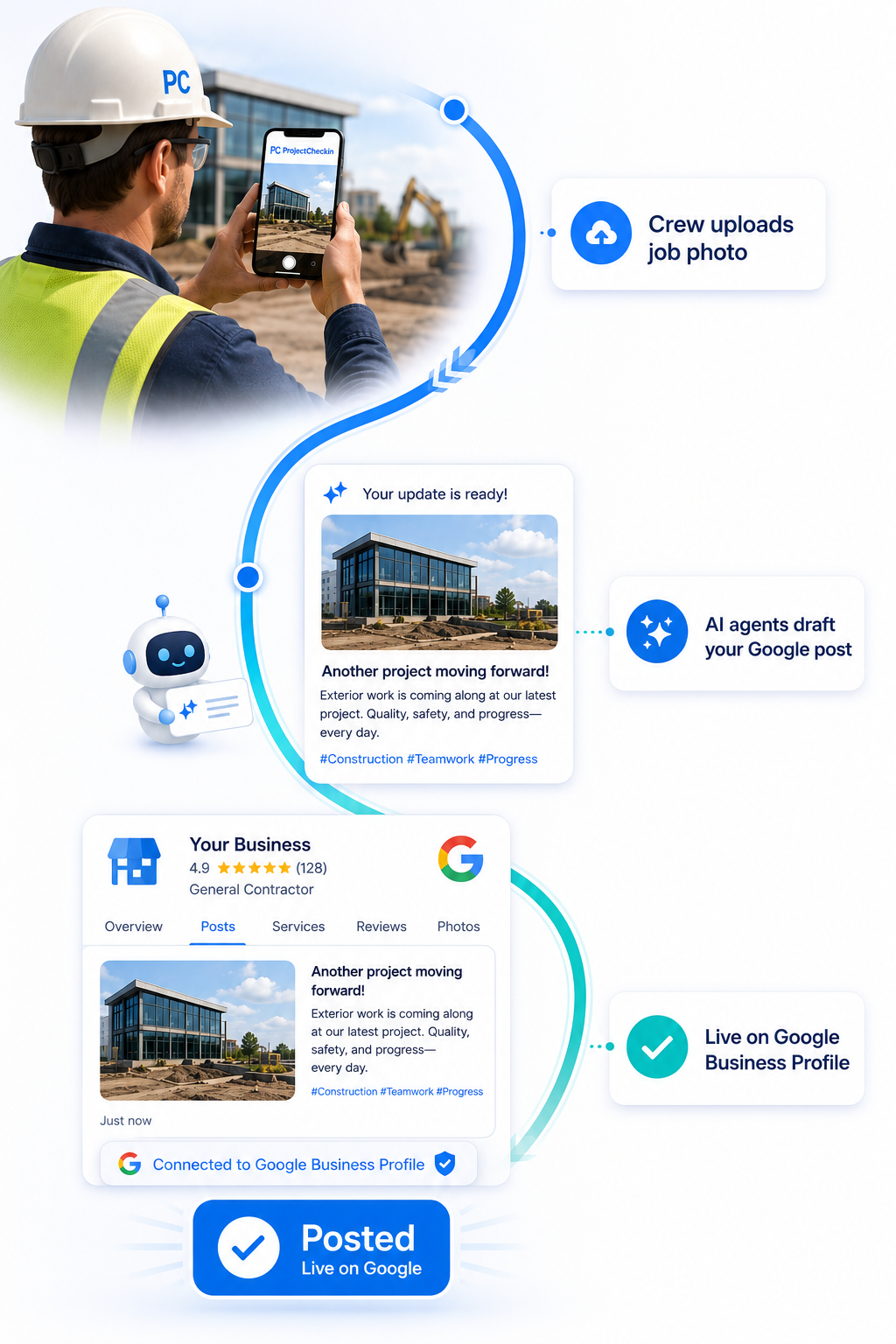
ProjectCheckin writes the caption, attaches the job photo, and sends it to your Google Business Profile — straight from your dashboard. No logging into Google. No writing. Your listing stays active without any extra work.
What is a GBP Post? A Google Business Profile post is a short update — photo plus a caption — that appears on your business listing in Google Search and Google Maps. When homeowners search for you, they see recent jobs. When Google checks your listing, it sees an active business.
How it works
Finish a job. It's already posted to Google.
1
The post writes itself
Your crew submits photos and job details through the app. ProjectCheckin reads what was done — where, what service, which photos — and drafts a Google Business Profile post. You don't write anything.
2
Send it from your dashboard
Your Google Business Profile is connected directly to your account. When the draft looks right, one button sends it. No logging into Google. No switching apps. No copy-pasting.
Post to Google Business
3
Your listing stays active
The post goes live on your Google Business Profile — visible in Google Search and Google Maps. One new post per job means your listing always shows recent, real work. Google notices.
What you get
What consistent GBP posting actually does for your business.
Google's local ranking algorithm weighs engagement signals — how often a business updates its profile, adds photos, and posts content. Most businesses create a GBP listing and never touch it again. Regular job posts directly address that gap. Every post is a signal that you're active, working, and present in the areas you serve. Consistency over time is what moves the needle — not a single burst of posts.
This stat is from Google's own GBP data. Homeowners respond to photos of real finished work — not clipart, stock images, or an empty photo section. Every job post adds a fresh, real photo to your GBP listing. Over 6 months of regular posting, your listing looks like what it is: an active business doing real jobs. That visual credibility converts browsers into callers before they've even visited your website.
When a prospect gets your card, sees your truck, or hears about you from a neighbor, the first thing they do is Google your name. What they find on that results page determines whether they call. A stale GBP with no recent activity says the business might not be operating anymore. A GBP with a post from last week — showing a finished job two streets over — says the opposite. GBP posts reach the people most likely to become customers.
The caption is generated from what's already in the job record: the door type, the city, the date, and any notes your crew or office added. A typical output: "Iron door installation completed in Nashville, TN. Double-entry with custom glass panel. See the full project with photos →". No marketing copy. No thinking. The post reads like a real business update because it is one — it just happened to write itself.
A GBP post shows one photo and a short caption — enough to get attention. The "See the full project" link takes interested homeowners to the full Local Job Page: all the photos, the job notes, the exact location, and a direct call-to-action to contact you. The GBP post creates the first impression; the job page handles the close. Most businesses have no landing page behind their GBP. Yours does.
Most businesses that try to post to their GBP manually give up because logging into Google's Business Profile tools is cumbersome — especially mid-day from a phone on a job site. After a one-time Google account connection in your ProjectCheckin account settings, posting is a single button click from the same dashboard you already use. No context switching. No loading a separate app. The friction is eliminated, which is the only reason consistent posting ever actually happens.
The expiration that frustrates businesses that post manually is an advantage for businesses that post consistently. A business that posts every time they publish a job always has a current post showing. A business that doesn't — or that posts once and stops — shows nothing. If a competitor's last GBP post was four months ago, your listing showing last week's job is a direct contrast. The 7-day limit keeps the bar clear: to stay visible, you have to keep working and keep posting. You already do the work. ProjectCheckin handles the rest.
Google Business Profile posts appear in the "Updates" section of your business listing across every Google surface: Google Search results, the Google Maps business panel, and Google Search on mobile. Homeowners who find your business while navigating to a job site, searching from a phone, or looking you up after a referral all see the same thing: a business that posted a finished project recently. That consistency, across every screen they might use, is what makes the listing feel alive rather than abandoned.
Let your jobs keep your Google listing fresh.
Start FreeGBP posting included on Pro, Elite, and Titan plans
42%
more direction requests for businesses with active GBP photo galleries vs. those without.
Google Business Profile data
35%
more website clicks for businesses with active photo galleries vs. those without.
Google Business Profile data
Common questions
How does GBP posting work?
A Google Business Profile (GBP) Post is a short update — photo plus caption — that appears on your business listing when someone searches for you in Google Search or Google Maps. It shows in the "Updates" section of your profile and is visible to anyone who finds your business on Google. Posts expire after 7 days, which is why consistent posting matters.
ProjectCheckin generates the caption from the job data your crew already entered: service type, city, and any notes. A typical caption looks like: "Iron door installation completed in Huntsville, AL. Double-entry with decorative glass and forged hardware. See the full project — photos and details — on our project page." The caption includes a link to the full Local Job Page for anyone who wants to see more.
No. You connect your Google Business Profile once from your Account settings. After that, clicking "Post to Google Business" on any published job card in your dashboard sends the post directly — no separate login, no copy-pasting, no browser switching required.
No — it works in your favor. If you publish one job per week, your Google Business Profile always shows a fresh post from the current week. The 7-day window means consistent job publishing translates directly into a constantly updated listing. Google rewards active profiles with better placement in local results. Businesses that post once and stop show nothing. Yours shows last week's job.
Local Job Pages are permanent, indexed web pages that build long-term search presence — they stay live indefinitely and accumulate value over time. GBP Posts are short-lived updates (7 days) that appear directly on your Google Business Profile and reach people searching for your business right now. They work together: the GBP post drives immediate visibility, the Local Job Page builds durable presence.
GBP posting is available on Pro, Elite, and Titan plans. Pro and Elite plans post links back to the full job page on projectcheckin.com. Titan plans post links to the job page on your own domain — so the traffic and any SEO credit from that click goes to your own website instead of ours.
You'll need a Google Business Profile to use this feature — it's free to create at business.google.com. If you already have one but haven't verified it, Google requires verification before posts are visible publicly. Your ProjectCheckin Account settings include a step-by-step guide to connect your existing GBP once it's verified.